
Skip to content
  • Home
  • Features
  • Pricing
  • More Addons
    • TLMS Open Badges
    • TLMS Advanced Fields
    • TLMS Dashboard
  • Help
  • TutorLMS Fix
  • Contact
  • Blog
  • Login
  • 0

Introduction

  • TLMS Power Tools

First Steps

  • System Requirements

Dashboard

  • Getting to know the Dashboard Submenu

Course Management

  • Management Panel

Validity of Certificates

  • Validity of Certificates (Student Dashboard)
  • General functionalities
  • CSV/PDF Reports

Quiz Reports

  • My Quiz Attempts (Student Dashboard)
  • Quiz Reports

Certificate Report

  • Certificate Report

Email Settings

  • Email Settings

Sale and Renewal of Certificates

  • Functionality: Certificate Sales and Renewals

Shortcodes for Certificates

  • Shortcodes for Certificates

Badge

  • Verified Badges

Q&A Central Hub

  • Q&A Central Hub: Manage Tutor LMS comments quickly

Login & Session

  • Always-On Session

LinkedIn

  • LinkedIn “Add to Profile” Integration
View Categories
  • Home
  • Documention
  • Dashboard

Getting to know the Dashboard Submenu

< 1 min read

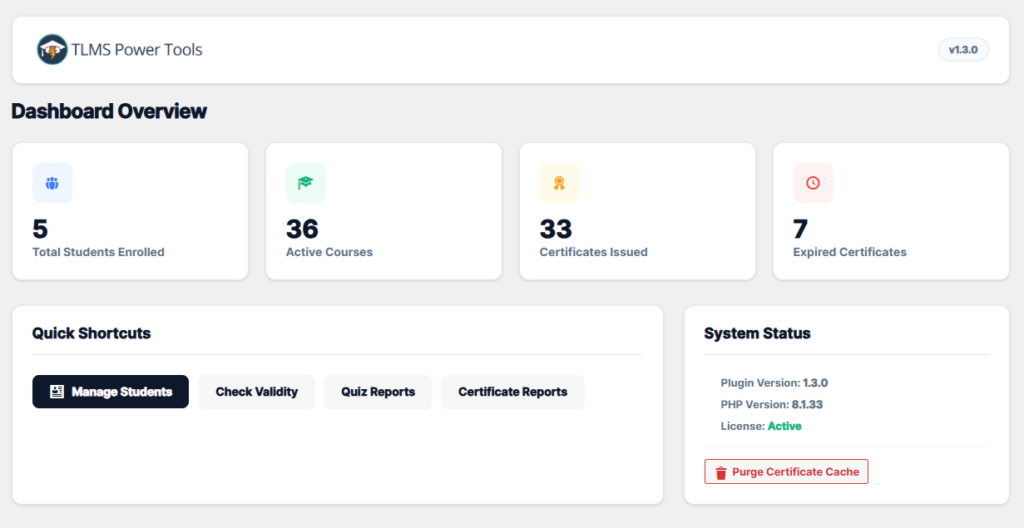
In this submenu, you can view the main statistics:

–Total enrolled students
-Active courses
Total certificates issued
Expired certificates

You’ll also find quick shortcuts for faster access to the most frequently used submenus.

There’s a system status section with useful information:

–Plugin version
-PHP version
-And license status.
Furthermore, you’ll find a button that says “Purge Certificate Cache.” This is useful when you want to download a student’s certificate and need to use the latest version (to eliminate errors that might occur during download). Simply click this button, and you’re done.
Updated on January 2, 2026

What are your Feelings

  • Happy
  • Normal
  • Sad

Share This Article :

  • Facebook
  • X
  • LinkedIn
  • Pinterest
Getting to know the Dashboard SubmenuGetting to know the Dashboard Submenu

Automate, optimize, and empower your online courses with the most advanced LMS tools.

Support
  • TutorLMS Fix
  • Support
  • Contact
  • Documentation
  • FAQ
Company
  • About us
  • Terms & Privacy
Resources
  • Princing
  • Release notes
  • Roadmap
Social
  • Facebook

©TLMS Power Tools. All Rights Reserved.

Review My Order

0

Subtotal

Taxes & shipping calculated at checkout

Checkout

Notifications