
Skip to content
  • Home
  • Features
  • Pricing
  • More Addons
    • TLMS Open Badges
    • TLMS Advanced Fields
    • TLMS Dashboard
  • Help
  • TutorLMS Fix
  • Contact
  • Blog
  • Login
  • 0

Introduction

  • TLMS Power Tools

First Steps

  • System Requirements

Dashboard

  • Getting to know the Dashboard Submenu

Course Management

  • Management Panel

Validity of Certificates

  • Validity of Certificates (Student Dashboard)
  • General functionalities
  • CSV/PDF Reports

Quiz Reports

  • My Quiz Attempts (Student Dashboard)
  • Quiz Reports

Certificate Report

  • Certificate Report

Email Settings

  • Email Settings

Sale and Renewal of Certificates

  • Functionality: Certificate Sales and Renewals

Shortcodes for Certificates

  • Shortcodes for Certificates

Badge

  • Verified Badges

Q&A Central Hub

  • Q&A Central Hub: Manage Tutor LMS comments quickly

Login & Session

  • Always-On Session

LinkedIn

  • LinkedIn “Add to Profile” Integration
View Categories
  • Home
  • Documention
  • Login & Session

Always-On Session

< 1 min read

“Always-On Session” is an intelligent session manager designed specifically for LMS environments. By default, WordPress closes user sessions after certain periods of inactivity (usually short), which is detrimental to online learning where a student might spend hours watching a video without interacting with the page.

This feature extends and protects the active user’s session, ensuring they are never unintentionally logged out while studying, taking an exam, or watching a long lesson.

What are the advantages of our functionality?

-It prevents students from being redirected to the login page (wp-login.php) when trying to mark a lesson as complete after a long video.

-It prevents data loss on lengthy quizzes if the session expires mid-test.

-It eliminates the frustration of having to log in repeatedly.

Technical Specifications:

-Automatic extension of WordPress authentication cookie expiration.

-Transparent setup: Works in the background without requiring user action.

-Compatible with standard WordPress security policies.

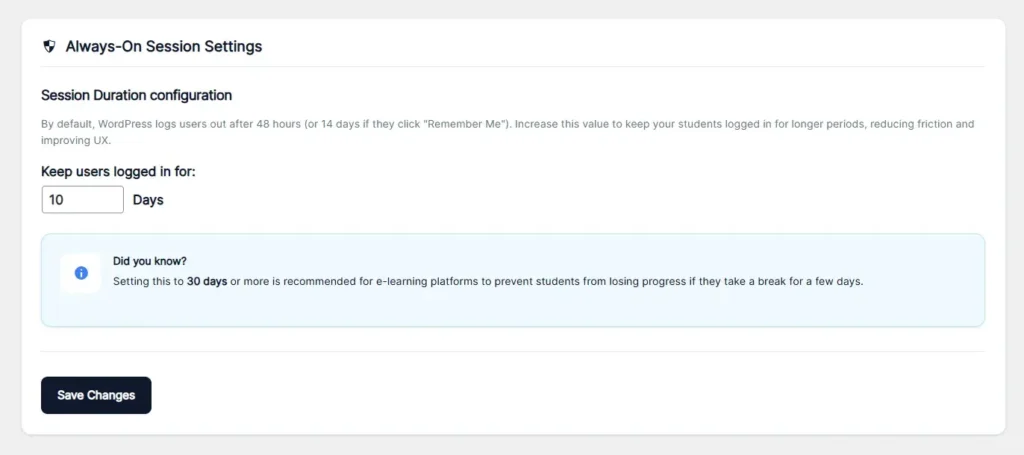
Session Duration configuration:

-By default, WordPress logs users out after 48 hours (or 14 days if they click “Remember Me”). Increase this value to keep your students logged in for longer periods, reducing friction and improving UX.

Updated on January 19, 2026

What are your Feelings

  • Happy
  • Normal
  • Sad

Share This Article :

  • Facebook
  • X
  • LinkedIn
  • Pinterest
Always-On SessionAlways-On Session

Automate, optimize, and empower your online courses with the most advanced LMS tools.

Support
  • TutorLMS Fix
  • Support
  • Contact
  • Documentation
  • FAQ
Company
  • About us
  • Terms & Privacy
Resources
  • Princing
  • Release notes
  • Roadmap
Social
  • Facebook

©TLMS Power Tools. All Rights Reserved.

Review My Order

0

Subtotal

Taxes & shipping calculated at checkout

Checkout

Notifications