
This new tab in the student menu acts as a “Digital Wallet” for certifications. It displays a clear table with the status of all completed courses.
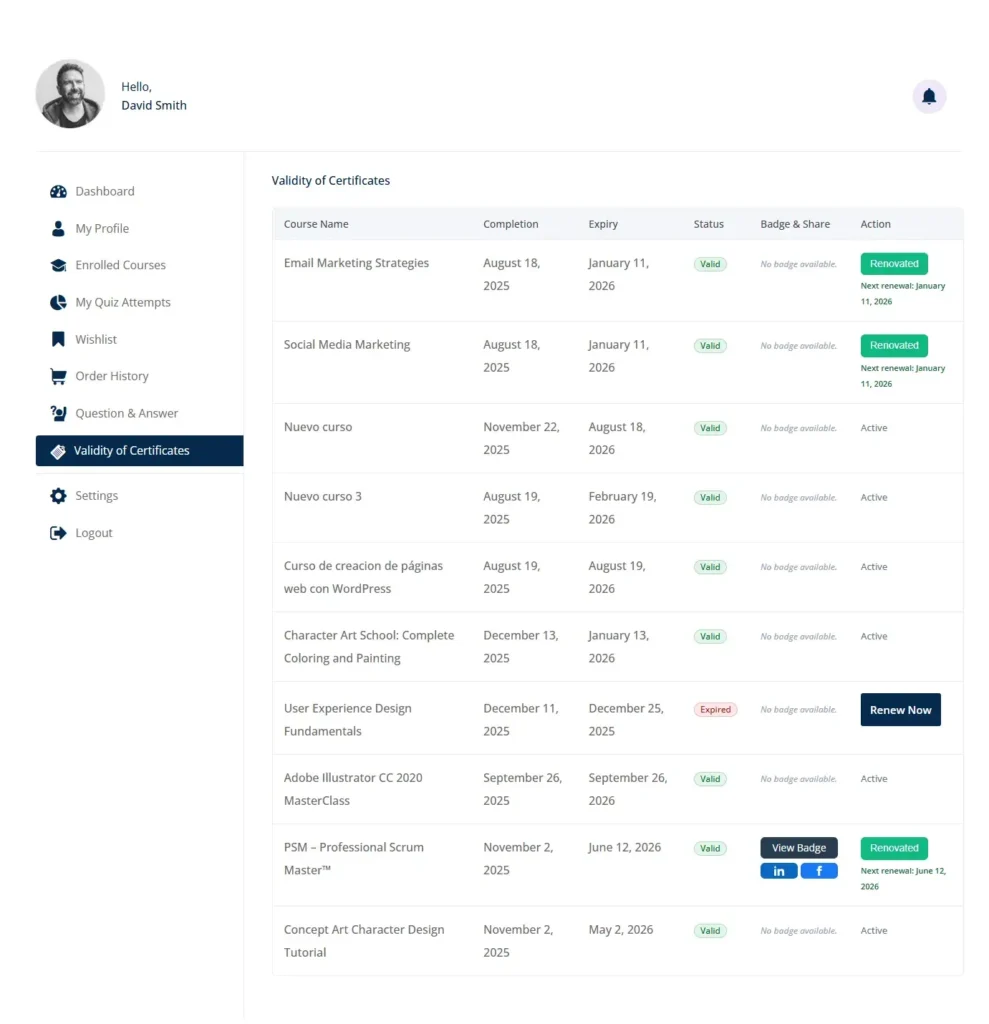
1.- Columns and Visible Data:
Course Name: Name of the completed course.
Completion: Original date the course was completed.
Expiry: The exact date the current certificate expires.
Status: Visual indicator (traffic light).
🟢 Valid/Lifetime: The certificate is valid.
🔴 Expired: The certificate has expired and requires attention.
🟠 Pending Exam: (Special) Appears when the student has already paid for renewal but still needs to pass the recertification exam.
2.- Available Actions (Buttons):

Renew Now:
When it appears: When the status is “Expired”.
Function: Redirects the student directly to the payment product (WooCommerce) configured to renew that specific certificate.
3.- Take Exam:
When it appears: Immediately after paying for a renewal that requires re-evaluation.
Function: Takes the student directly to the validation exam without going through unnecessary intermediate pages.
Renewed:

When it appears: After a successful renewal.
Extra info: Displays a small text below indicating the next renewal date (“Next renewal: [Date]”).
Badge Integration: If the course has active badges, a “Badge & Share” column appears with social tools:
View Badge: Opens the public badge verification page.
Social Buttons: Small LinkedIn and Facebook icons that allow sharing the certification on the student’s profile with a single click.


